The abbreviation RPA stands for Robotic Process Automation.
The software robot executes a script that mimics human operation of an application using the mouse and keyboard. This way, it takes over recurring steps across multiple systems without the need for those systems to be adapted.
In practice, the bot is both the operational and billing unit: it is built in a development environment, distributed via central control, and licensed per instance.
To put it plainly, an RPA bot interacts with the screen instead of accessing the database. It logs into an application, clicks fields, copies values, and enters them elsewhere. This way of working at the presentation layer explains both why the bot works even where no interface exists, and why it stops working as soon as the user interface changes.
An RPA bot has no physical form like an industrial robot; it operates exclusively in a digital environment. It is distinguished from the general computer science concept of a bot, such as a search engine crawler, by its use in business processes.
Manufacturer terms like „Digital Worker“ or „Digital Assistant“ mean the same thing: SAP uses „Digital Assistant“ synonymously with Attended Bot.
Typical use cases for RPA bots
Typical use cases for RPA bots are highly structured, repetitive, and rule-based routine tasks. Especially when API interfaces are missing.
Examples:
- A portal only provides data on the screen, not as a file. Customer portals of large clients, supplier and tender platforms, authority portals. The bot retrieves orders, tenders, or notices from there and registers them in its own system.
- The connection between two applications is missing, so someone types the same information twice. Address, price, and item changes that need to arrive simultaneously in CRM, ERP, and the shop are the standard case.
- A process begins in the inbox. From an email, web form, or scanned paper, a record is created in the specialized system, such as a claim report for an insurer or a complaint in quality management.
- A mass run repeats on a schedule. Reconcile inventory, process meter readings, check deadlines, generate month-end reports. Such runs are suitable for unattended operation at night, while bots at the workplace tend to accompany individual processes.
- One task is time-limited and too large for manual labor. Data migration during a system change, mass maintenance after a price round, post-documentation after an audit.
Typical use cases have the following in common: fixed workflow, structured input data, enough repetitions per week to support development and maintenance.
By industry, cases pile up where large volumes of evidence and regulation intersect, meaning in the banking and insurance sectors, with energy providers, and in administration. The five characteristics a candidate process must meet are listed below under „Which processes can withstand a bot.“.
In marketing, a bot is rarely the first choice. Advertising and analytics platforms usually offer documented interfaces, and those who pull campaign data through them get it more stably than through a recreated click path in the ad account. RPA only becomes interesting for tools without an API, such as an older PIM or a supplier portal without data export.
This is how a bot works on the user interface
RPA automates „outside-in“: the tools operate on the surface of other computer systems, just as a human would. The information system itself remains unchanged. This distinguishes the approach from classic workflow technology, which intervenes in the application „inside-out.“.
The practical advantage: bots can also be used where no API exists or resources for deep integration are lacking.
From triggers to feedback
A bot run begins with a trigger, which is an event or condition that starts the task. This can be a schedule, logic in the process flow, or, for attended bots, an action by an employee.
The bot then collects the necessary data, typically from emails, spreadsheets, CRM or ERP systems, and databases. Only then do the actual actions on the interface follow: logging in, navigating, filling in fields, transferring values, filing documents.
The process concludes with the delivery of results, and this is precisely where operational reliability is determined. If an exception occurs—for example, due to conflicting data—the process is routed to manual processing rather than blocking the run. If you don’t plan for this fallback path, you’ll end up building a bot that halts the entire batch at the first unexpected data record.
Studio, Orchestrator, Robot
An RPA platform typically consists of three components.
- In the studio, automation is created visually. At UiPath, for example, this is done as a sequence, flow, or state diagram with activities for every keyboard and mouse input.
- The Orchestrator handles deployment, configuration, scheduling, queue management, and logging
- The robot is the entity that actually executes the process and replicates user actions on the screen
The script is created and tested in the development environment, stored centrally in the repository, and executed in a selected runtime environment.
Those who only procure „a bot“ and omit orchestration lose control over queues, schedules, and logs. This precise layer transforms individual automations into scalable operations because runs can be distributed, prioritized, and traced.
Why Selectors Determine Success
Traditional RPA tools such as UiPath, Automation Anywhere, Blue Prism, and Power Automate link their steps to specific UI elements: selectors, XPaths, and object IDs.
If a screen changes, a new version of the application is released, or a provider renames a class, this binding may be broken and the bot will stop.
SAP's formulation of the same issue is vendor-neutral: Bots rely on user interface elements. Therefore, even the smallest changes to the application can disrupt automation.
This leads to a requirement for the candidate process. The more frequently the target system changes, the more expensive the bot becomes to maintain, regardless of how well it is built. Regular updates, ongoing monitoring, and robust governance are therefore prerequisites for reliable operation.
Attended or unattended?
Choosing the right type is the first decision. It determines under whose permissions the bot runs, where it is executed, and who is responsible for the process. It directly affects licensing costs, because unattended execution is billed differently than operation at a workstation.
Attended: Bot in the Workplace
Attended bots are waiting to be activated by employees. In Attended Mode, the bot works as a virtual assistant on a departmental employee's computer. It runs under their supervision and with their user rights. Process responsibility thus remains with the human, and the bot runs on their desktop or on a virtual second desktop.
This deployment primarily targets front-office activities and is visible at the workstation. Therefore, it's also referred to as Robotic Desktop Automation (RDA) or a Digital Assistant. This is the suitable type when a caseworker makes decisions for each process and the bot only handles the typing. While rights over the employee account simplify the setup, they also tie the bot to the user's presence and login.
Unattended: Bot on the virtual machine
Unattended bots operate independently and carry out a rule-based process from start to finish. They are triggered according to a schedule or by logic within the process flow, not by a human. They run on spare or virtual machines so that the workload can be handled at all.
This model is designed for high-volume processing and handles tasks entirely without supervision. There are two costs involved: Every unattended automation process requires its own license. On top of that, you need an execution environment that’s available even at night and on weekends. If you want to have 4,000 invoice line items transferred overnight, unattended operation is essential, but you’ll need to factor in both the license and the infrastructure costs.
When a hybrid setup is worthwhile
A hybrid setup divides the process at the point where human decision-making ends. The employee checks and initiates the process, while an unattended instance takes over the volume-intensive remainder, either on a schedule or via a queue. This division makes sense where only the first step requires discretion, but the downstream part is entirely rule-based. The research does not provide reliable metrics on the spread and benefit of hybrid setups. [Research Gap, Human Review]
Recorded, clicked, or programmed
According to Gartner's market definition, bot scripts are created either (1) through programming or (2) via a low-code or no-code interface.
The third approach is recording: Citizen Developers record a sequence of steps as they are performed. The system then converts these actions into repeatable workflows that the bot executes later. All three approaches lead to the same result: a script stored in the repository and deployed to a runtime environment.
The paths vary in length. This guide is suitable for short, linear click paths without branches and is the quickest way for departments to get started.
As soon as conditions, loops, exception handling, and inter-application data transfers come into play, you'll need to use Studio. There, the activities are structured as sequence, flow, or state diagrams.
The typical mistake is to immediately put a recorded click path into production: It contains no checks, no exclusion path for erroneous data records, and breaks with the first surface change. Since every script is tested and approved before deployment, the effort for testing and governance must be included in every estimate, regardless of the chosen path.
Which processes can withstand a bot
A candidate process can be tested using five characteristics. It must be rule-based, because the bot follows a predefined workflow and makes no independent decisions. The input data should be structured, as RPA bots only follow the processes defined by the end user.
Machine learning algorithms can recognize patterns in unstructured data. The target system must be stable, otherwise maintenance will negate the benefits. The volume must justify the effort, with unsupervised bots being designed precisely for large quantities. And the exceptions must be identifiable so that an exclusion path can be defined.
Exclusion criteria
Processes involving discretionary decisions are unsuitable, because RPA follows only clearly defined instructions. The bot lacks built-in „common sense“ to make decisions when things are unclear. Processes involving unstructured input data are equally problematic, because without additional components, the bot cannot recognize patterns or learn from experience.
The third exclusion criterion is a frequently changing target system. Bots require constant maintenance, sometimes more frequently than regular applications. This is especially true if the underlying systems change, such as Website, where data is fetched from. Regulatory changes in the business process also necessitate adjustments to the bot. A process that is unstable in both dimensions causes ongoing change effort. It should rather be automated via an interface or not at all.
What a bot costs per month
Billing for unsupervised automation is not per user, but per concurrently running bot. Microsoft Power Automate shows this logic with public list prices:
- Per-User Model: $15 per user per month
- Process Plan for Unattended RPA: $150 per bot and month
- Hosted Process for Cloud-Hosted Bots: $215 per bot per month
A team with four parallel unsupervised processes comes to $600 monthly even before the underlying premium user licenses are counted. The values come from third-party price overviews. Before calculating, they should be checked against the manufacturer's official price list, especially for prices in Euros.
So, costs increase with parallelism, not with the number of automations. Processes that can run sequentially share an instance. However, someone who starts five workflows simultaneously at 6 AM pays four times as much without any functional reason, even though four of them could also run spread throughout the day.
Why a license is not the same as total cost
In addition to the license, there are at least four other cost items. Development in the studio, including testing and release, is project effort that, with complex processes, is not completed with a single recording. Orchestration with deployment, queue management, and logging is its own platform component. Unattended bots require physical or virtual machines as execution environments. And ongoing maintenance is a permanent cost because bots need to be adjusted more frequently than regular applications. In addition, people are still needed to review exceptions and assess when improvements are necessary.
Why bots stop working
Failures typically have one of three causes: The surface attachment breaks, a data record doesn't fit the rule set, or login details and permissions are no longer valid. All three can be mitigated before going live through clear responsibilities and mechanisms.
Updates on the target system
A new release of the target application, a modified screen mask, or a renamed class name are enough for a selector to fail and the bot to stop. The crucial question is who is responsible for this adjustment. In practice, this responsibility lies with the user company, not the provider of the target software. They must ensure operability and adapt the bot for updates and releases. Therefore, whoever implements the bot needs a process that is aware of the target systems' release dates. Test runs must be conducted beforehand; otherwise, failures will only surface in production.
What happens in case of errors
Exceptions such as missing data, rule violations, or system errors often require human intervention. A viable exception handling system diverts the affected process for manual follow-up and allows the bot to continue with the next data record. If this path is missing, every deviation slows down the entire process, and the time savings are reversed. This diversion should be part of the development phase, not a later expansion stage.
Access data and authorizations
Bots need access to multiple systems, usually with the same hardcoded credentials. This opens an attack vector for attackers who can manipulate the bots. Because software robots can also be generated automatically, the risk grows with their number. Credentials for privileged accounts used by robot scripts are a threat if they are assigned and stored insecurely. Centralized credential management and dedicated, minimally privileged bot accounts should therefore be part of the planning at the second productive bot at the latest, not just during scaling.
Bot, API, or AI agent?
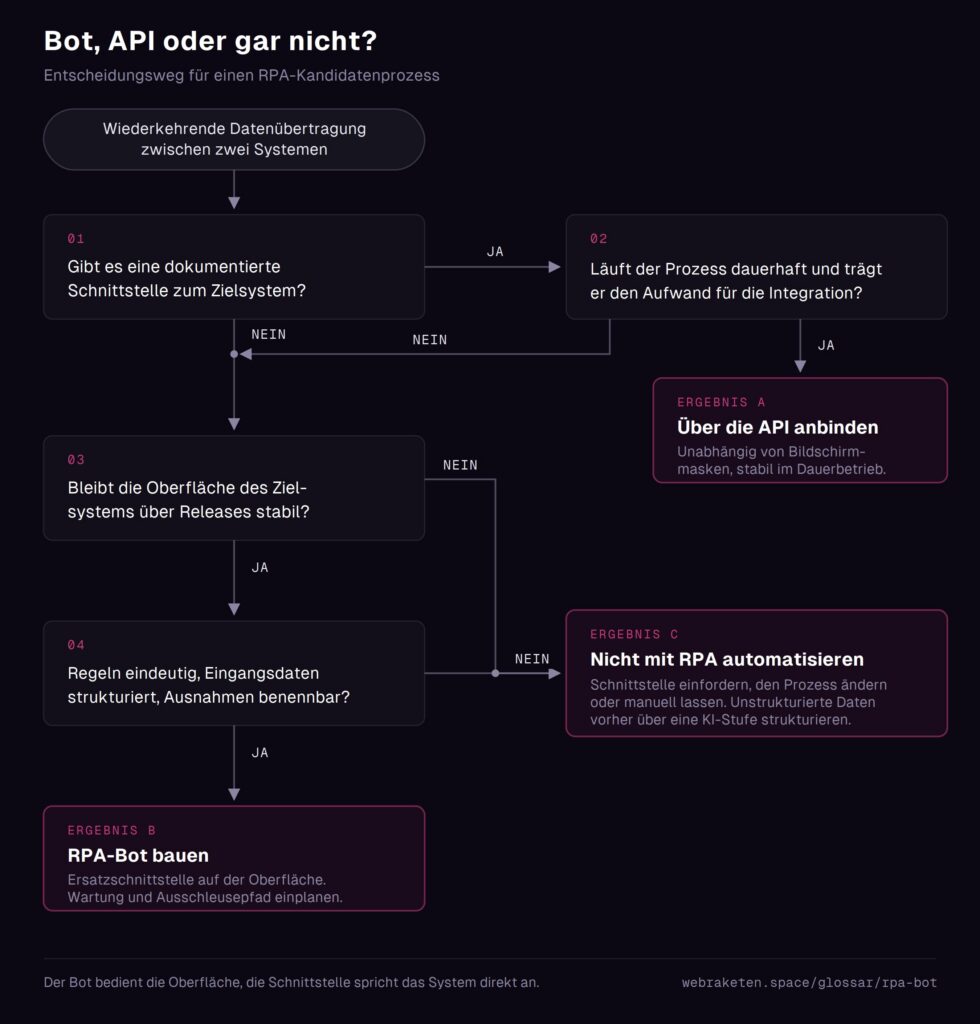
RPA and APIs both reduce manual effort but are fundamentally different tools. The wrong choice costs rework and budget. The difference lies in the level: the bot operates at the presentation layer, while the interface directly addresses the system. A macro, on the other hand, only covers processes within a single application, while the bot connects multiple systems via their interfaces.
When the API is the better choice
If a documented interface exists and the process is intended to run permanently, connecting via the API is the more stable solution. It operates independently of screen masks and selectors. The bot has an advantage where no API is available or where resources for deep integration are lacking.
His second advantage: The underlying systems remain unchanged. This makes it suitable for legacy applications and for environments with strict change control regulations. As a rule of thumb: API for stable continuous operation and existing interfaces, Bot as a workaround where no access below the surface is available.
An existing interface does not automatically exclude the bot. If the process is only temporary or the budget for integration is missing, the bot remains the pragmatic choice, but it must meet the same requirements for stability and data quality.
Where RPA ends and AI begins
RPA should not be confused with artificial intelligence, because the technology follows a predefined process. The bot can only execute processes defined by the end-user. In contrast, AI-powered methods use machine learning to recognize patterns, especially in unstructured data, and improve over time. A chatbot, on the other hand, engages in a dialogue with users and is therefore its own category, not a process executor.
The combination at the breaking point is sensible: A learning process structures the input data, for example from documents, and the bot then takes over rule-based further processing via the system interfaces. Anyone who expects a pure RPA bot to make sensible decisions in unclear cases underestimates its limitations, as it does not have „common sense.“.
FAQ
Does an RPA bot replace an employee?
Typically not. The bot handles repetitive, rule-based steps and thus reduces the burden. Exceptions still need to be reviewed and assessed by humans. The question of when automation should be adjusted or improved also remains a human task. The assumption that bots replace jobs is considered one of the most common misconceptions on the topic.
What requirements must a company meet to use a bot?
A documented, rule-based process with structured input data and a sufficiently stable target system are necessary. Technically, the bot requires its own access and accounts with appropriate permissions, as well as an execution environment, for unattended operation a dedicated or virtual machine. Organizationally, it must be clarified before starting who is responsible for the operability in the event of target system releases, as this task lies with the implementing company.
Why is it called „robotic“ when nothing is physical?
The "bot" component refers to the imitation of human operating steps, not hardware. The bot imitates the operation of the user interface, meaning clicks and keyboard inputs. It does not have a physical form like an industrial robot; it operates exclusively in a digital environment.
Is an RPA bot artificial intelligence?
No, not in its basic form. RPA is based on automation technology that follows a predefined process, and the bot can only execute defined processes. Learning ability and pattern recognition