- Better navigation / usability: Visitors are directed to relevant topics and can easily find their way around the page (which can lead to a longer dwell time)
- Search engine indexing: Search engines like Google use links to find and understand new subpages.
- Distribution of link juice: Strength and authority (link juice) flow from large pages to important subpages.
For search engines it fulfills three tasks: It helps to find and crawl pages, it conveys the structure of the Website and it passes authority (link juice) on to the target.
For users, it is the means of navigation and orientation, and thereby indirectly influences the ranking as well. The longer a person stays on the website and the lower the bounce rate, the better the ranking in search engines can become.
The term is used in two different senses. On the one hand, it refers to an individual link; on the other hand, it refers to the overall structure of all internal links—that is, the internal link architecture.
The topic of internal linking is counted among on-pageSEO and on the information architecture.
Important to understand: While an internal link is part of link building, it should not be confused with a backlink, which is also part of it. This is because a backlink comes from an external domain and is difficult to control, whereas internal links are entirely in one's own hands.
Also not belonging to the internal links is a jump link using a hash sign (#). This only refers to a location within the same page, but not to another subpage.
The direction of the link is also important for the analysis. A page has outbound internal links and inbound internal links.
What internal links do on Google
Above all, internal links help Google better understand the site structure.
Google calls in its own documentation one minimum requirement: Every important page should be linked from at least one other page on your own website. A page without an incoming internal link can still enter the index via an XML sitemap or an external link, but it remains unreachable from your own website.
The second level is structural understanding: through linking, a search engine recognizes which pages belong together (also in terms of content) and which ones are subordinate to another. Google explicitly recommends contextual references to further internal content for this purpose, i.e., links from within the running text instead of just from navigation elements.
The third level is the transfer of authority. A page gains link equity (link juice) through external links or through its position in the site structure. This link equity is passed on to other pages on the same domain via internal links. This has a practical implication: Internal linking does not create new authority; it redistributes existing authority. So if you want to strengthen a subpage, you must provide it with links from pages that are well-linked themselves.
In addition, there is the benefit for visitors: they can use internal links to reach the next relevant content without having to return to the search. And what is good for the visitor is also good for Google.
Pitfall: Setting links correctly from a technical standpoint
Before anchor texts and structural models play a role, the reference must be technically sound and recognizable as a link by the crawlers.
Google can usually only crawl a link if it is as <a>-Element with href-attribute is marked. References in other formats are usually not parsed and do not exist for the search engine.
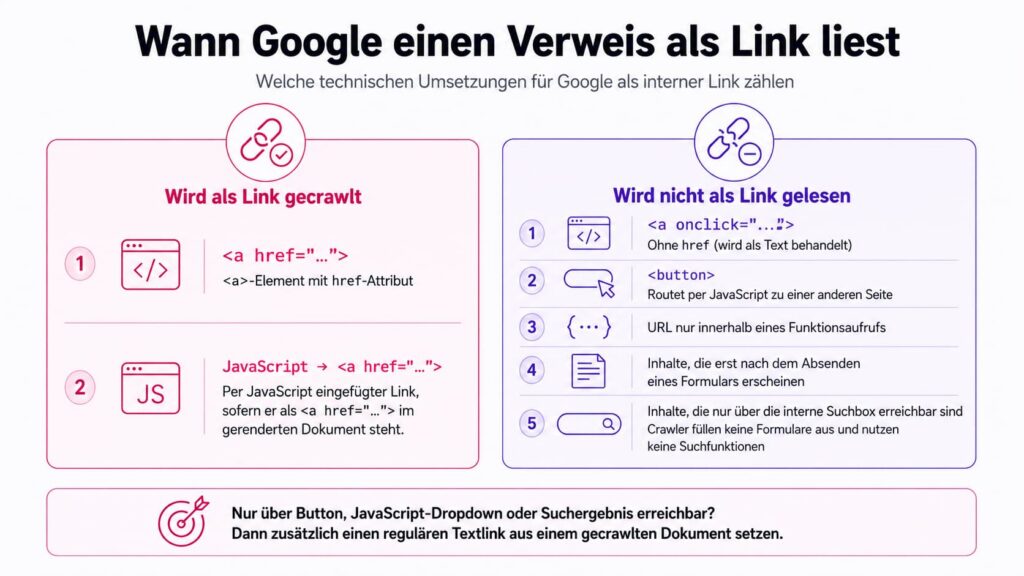
Links dynamically inserted via JavaScript are crawlable, provided they use the same HTML markup. Therefore, they must also be as <a href="/en/…/"> end up in the rendered document.
However, this does not apply to URLs that are only within a function call. A <a onclick="…"> without href is treated as text. And a is not a link, even if it redirects to another page via JavaScript. Content that appears only after a form is submitted or via an internal search box also remains inaccessible. This is because crawlers do not fill out forms or use search functions.
This leads to a simple test: Is an important page accessible only via a button, a dropdown with a JavaScript handler, or a search result? If so, it also needs a regular text link from a crawled document.
Using anchor texts correctly
The anchor text (also link text) is the visible, clickable text of an HTML link. Example:
<ahref="https://webraketen.space/seo-agentur/&">SEO agency</a>The anchor text here is: „SEO Agency“.
Google describes the Anchor text requirement Concise: descriptive, short, and relevant to the landing page. The documentation explicitly advises against generic phrasing like „click here“ or „learn more“ because they do not provide any indication of the destination.
For image links, the old-attribute for this task. A linked image without alternative text therefore does not provide any textual signal.
Observations show that diverse anchor texts pointing to a page have the best effect. In the example above, you should therefore not always just link „SEO Agency“, but also incorporate text-related variations such as „best SEO agency in Germany“ or „agency for search engine optimization“ distributed across the website.
What is important here is that every single variant remains descriptive. Diversity is not an argument for vague formulations.
How many internal links and how deep to link?
There is no fixed upper limit. Google does not specify an ideal number of links per page, but rather a rule of thumb: If it looks like too many links, it is probably too many. This aligns with practical experience.
There is no limit, but every link must be justified by and anchored in the content. From a purely mathematical perspective, the more links a page includes, the more targets share the passed-on link equity.
Pages with a handful of or even no inlinks are more problematic, not pages with many.
Check existing link
The entry point is a crawl of your own website. With the SEO Spider even in the free version, up to 500 subpages can be scanned. There, the „Inlinks“ column in the links view shows how many internal links point to each crawled page.
In Semrush Site Audit is the counterpart called „Incoming Internal Links“ in the „Crawled Pages“ report. If you sort this column in ascending order, the poorly linked pages appear at the top. That is where the leverage is. The free Screaming Frog version is sufficient for websites under 500 pages. Larger projects require the paid version or an alternative.
A pure crawl does not find orphaned pages because it does not encounter them due to a lack of links. Screaming Frog therefore finds them by comparing data with three external sources: XML sitemaps, Google Analytics, and Google Search Console. Such pages are sometimes still in the index anyway, for historical reasons, via a sitemap, or via external links. However, without incoming internal links, they do not receive any internal PageRank.
For the cross-check, the Search Console's Links report is suitable. Under „Top linked pages, internal,“ you can check for each URL which of your own pages link to it. This allows you to verify whether the most important pages are actually connected.
Automate internal linking
Internal linking is work. Identifying suitable places, setting the link, searching further.
However, there are tools that can automate this. For all WordPress websites, the Internal Links Manager a free plugin that can be upgraded with optional pro features (e.g. caching).